
Operation Manual




V 2.9.0
MivaTek International, Inc. 14
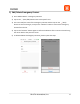
f.) Edit/Delete Emergency Contact
1) Go to Sidebar Menu -> Emergency Contacts.
2) Tap on the (Enter/Edit) button next to the specific user.
3) You can modify the name of the Emergency Contact and then tap on the (Save)
button to save the changes, or tap on the “Remove” button to remove the Emergency
Contact from the list.
4) Tap on the “Remove” button again to confirm the deletion of the contact. This will bring
the owner back to the previous screen.
5) To delete additional Emergency Contacts, please repeat the steps.