
Projector HOME-1 User's Manual

3
Projector Features
……………………………………
2
Preparation
……………………………………………………
2
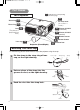
Part Names
……………………………………………………
4
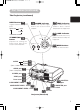
The Projector ………………………4
Fastening The Lens Cap …………4
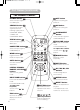
The Remote Control ………………6
Setting Up
…………………………………………………………
7
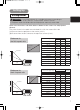
Arrangement ………………………7
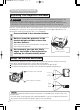
Adjusting The Projector’s
Elevator ……………………………8
Using The Picture Shift Dials ……8
Connecting Your Devices…………9
Connecting Power Supply ………11
Remote Control
…………………………………………
12
Putting Batteries …………………12
Operating The Remote Control…13
Power ON/OFF
…………………………………………
14
Turning On The Power …………14
Selecting An Input Signal ………15
Turning Off The Power …………16
Operating
……………………………………………………
17
Adjusting The Volume …………17
Temporarily Muting The Sound…17
Using The Automatic
Adjustment Feature………………18
Correcting Keystone
Distortions…………………………18
Signal Searching …………………19
Selecting The Aspect Ratio ……19
Temporarily Blanking
The Screen ………………………19
Selecting The Gamma Mode……20
Recalling Your Adjustments ……20
Multifunctional Settings
……………………
21
Using The Menu Functions ……21
MAIN Menu ………………………22
PICTURE-1 Menu ………………23
PICTURE-2 Menu ………………25
INPUT Menu ……………………26
AUTO Menu ………………………28
SCREEN Menu …………………29
OPTION Menu ……………………30
Lamp
………………………………………………………………
31
Replacing The Lamp ……………32
Air Filter
…………………………………………………………
33
Caring For The Air Filter…………33
Replacing The Air Filter …………34
Other Care
……………………………………………………
35
Caring For The Inside
Of The Projector …………………35
Caring For The Lens ……………35
Caring For The Cabinet
And Remote Control ……………35
Troubleshooting
……………………………………
36
Related Messages ………………36
Regarding
The Indicator Lamps ……………38
Phenomena That May Easily Be
Mistaken For Machine Defects …40
Warranty And After-Service ……41
Specifications
…………………………………………
42
TECHNICAL
Contents
01HOME-1En 03.9.11 4:18 PM ページ 3