
Operation Manual






36
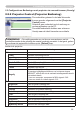
2.5.9 Projector Control (Vervolg)
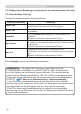
Onderdeel Bediening
Image
Aspect Selecteert de Aspect instelling.
Over Scan Past de Overscan instelling aan.
V Position Past de V Posit aan.
H Position Past de H Posit aan.
H Phase Past de H Fase aan.
H Size Past de H Size aan.
Auto Adjust Execute Voert Autom.Aanpas. uit.
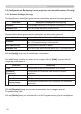
Input
Setup
Auto Keystone Execute
Voert de automatische keystone distortie correctie uit.
Keystone Past de Verticale Keystone instelling aan.
Whisper Selecteert de Stil Func. modus.
Mirror Selecteert de Spiegel status.
Volume Past de Volume instelling aan.
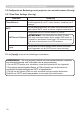
Audio-MIU Wijst de Audio-MIU input terminal toe.
Progressive Selecteert de Progressi. instelling.
Video NR Selecteert de Video N.R. instelling.
Color Space Selecteert de Klromvang.
C-Video Format Selecteert de Video Format instelling.
S-Video Format Selecteert de S-video format instelling.
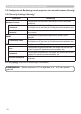
Frame Lock Schakelt de Stilzetten functie Aan/Uit.
Computer in Selecteert de computer ingangssignaaltype.
2. Verbinding uitrusting en netwerk instellingen
2.5 Conguratie en Bediening van de projector via een web browser (Vervolg)