
Operation Manual





82
4.1
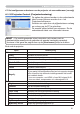
+HWFRQ¿JXUHUHQHQEHVWXUHQYDQGHSURMHFWRUYLDHHQZHEEURZVHUYHUYROJ
4. Beheer met webbrowsersoftware.
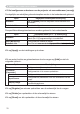
Optie Beschrijving
Image
Aspect Selecteert de aspectinstelling.
Over Scan Pas de over scan instelling aan.
V Position Past de verticale positie aan.
H Position Past de horizontale positie aan.
H Phase Past de horizontale fase aan.
H Size Past de horizontale grote aan.
Auto Adjust Execute 9RHUWGHDXWRPDWLVFKHDDQSDVVLQJXLW
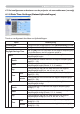
Input
Progressive Selecteert de progressieve instelling.
Video NR Selecteert de videoruisonderdrukking instelling.
Color Space Selecteert de kleurruimte.
Component Selecteert de component terminalinstelling.
C-Video Format Selecteert de videoformaatinstelling.
S-Video Format 6HOHFWHHUWGH6YLGHRIRUPDDWLQVWHOOLQJ
HDMI 6HOHFWHHUWGH+'0,LQVWHOOLQJ
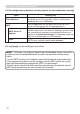
Frame Lock-Computer1
+LHUPHHVFKDNHOWXGHIXQFWLH6WLO]HWWHQ&RPSXWHUDDQXLW
Frame Lock-Computer2
+LHUPHHVFKDNHOWXGHIXQFWLH6WLO]HWWHQ&RPSXWHUDDQXLW
Frame Lock-HDMI 6FKDNHOWGHIUDPHORFN+'0,IXQFWLHDDQXLW
Computer in-1
Hiermee selecteert u het type van het inputsignaal van Computer 1.
Computer in-2
Hiermee selecteert u het type van het inputsignaal van Computer 2.
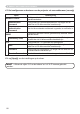
Setup
Auto Keystone
Execute
9RHUWGHDXWRPDWLVFKHWUDSH]LXPYHUYRUPLQJVFRUUHFWLHXLW
Keystone V Past de verticale trapeziumvervormingsinstelling aan.
Keystone H Past de horizontale trapeziumvervormingsinstelling aan.
Whisper 6HOHFWHHUGHUÀXLVWHUPRGXV
Mirror Selecteert de spiegelstatus.