
User Guide


57
2%.'55
24'5'06#6+10
/'07
56#46
5612
+06'48#.5
/1&'
2.#;
5.+&'5*19
10'6+/'
+OCIG
THUMBNAIL [ SD CARD]
+OCIG +OCIG
+OCIG +OCIG +OCIG
+OCIG +OCIG +OCIG
+OCIG +OCIG +OCIG
ENTER
: YES
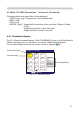
)ROORZLQJSLFWXUHDQGPRYLH¿OHVFDQEHGLVSOD\HG
• JPEG (.jpeg, .jpg) * Progressive is not corresponded.
• BMP (.bmp)
• PNG (.png)
• MPEG4 (.mp4) * Supported bit resolution rate is less than 1Mbps in Simple
3UR¿OH
Supported resolution is less than VGA.
Supported Audio format is only AAC.
4.2.1 Thumbnail display
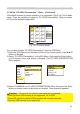
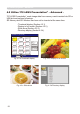
Fig.4.2.1 shows thumbnail display. Click [THUMBNAIL] button in the Web Remote
Control to display menu on the screen in order to make thumbnail display.
You can also display thumbnail by remote control or keypad (
53).
8WLOL]H³3&/(663UHVHQWDWLRQ´±$GYDQFHG&RQWLQXHG
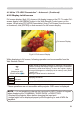
Fig. 4.2.1. Thumbnail display
Thumbnail Menu
Thumbnail Images
Focused image
4. Utilize projector – Advanced -