
Operation Manual




39
3URMHFWRU&RQWURO9HUYROJ
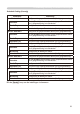
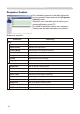
Onderdeel Bediening
Image
Aspect Selecteert de Aspect instelling.
Over Scan Selecteert de Overscan instelling.
V Position Past de V Posit aan.
H Position 3DVWGH+3RVLWDDQ
H Phase 3DVWGH+)DVHDDQ
H Size 3DVWGH+6L]HDDQ
Auto Adjust Voert Autom.Aanpas. uit.
Input
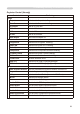
Setup
Auto Keystone Execute
Voert de automatische keystone distortie correctie uit.
Keystone Past de Keystone instelling aan.
Whisper Selecteert de Vent.Snelh. (Normaal of Stil Func.)
Mirror Selecteert de Spiegel status.
Volume Past de Volume instelling aan.
Audio-RGB1 Wijst de Audio-RGB1 input terminal toe.
Audio-RGB2 Wijst de Audio-RGB2 input terminal toe.
Audio-Video Wijst de Audio-Video input terminal toe.
Audio-S-Video Wijst de Audio-S-Video input terminal toe.
Audio-Component Wijst de Audio-Component input terminal toe.
Audio-MIU Wijst de Audio-MIU input terminal toe.
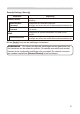
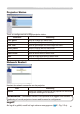
Progressive Selecteert de Progressi. instelling.
Video NR Selecteert de Video N.R. instelling.
Color Space Selecteert de Klromvang.
Component Selecteert de Component terminal instelling.
C-Video Format Selecteert de Video Format instelling.
S-Video Format Selecteert de S-video format instelling.
Frame Lock Schakelt Stilzetten in/uit.
RGB in-1 Selecteert het RGB1 ingangssignaaltype.
RGB in-2 Selecteert het RGB2 ingangssignaaltype.
2. Verbinding uitrusting en netwerk instellingen