
Operation Manual




42
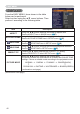
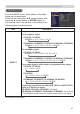
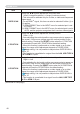
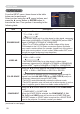
EASY MENU
EASY MENU
From the EASY MENU, items shown in the table
below can be performed.
Select an item using the ▲/▼ cursor buttons. Then
perform it according to the following table.
Item Description
ASPECT
Using the ◄/► buttons switches the mode for aspect ratio.
See the ASPECT item in IMAGE menu (
47).
AUTO KEYSTONE
Using the ► button executes the auto keystone function.
See the AUTO KEYSTONE item in SETUP menu (
54).
KEYSTONE
Using the ◄/► buttons corrects the vertical keystone distortion.
See the
KEYSTONE item in SETUP menu (
54).
KEYSTONE
Using the ◄/► buttons corrects the horizontal keystone distortion.
See the
KEYSTONE in SETUP menu (
55).
PERFECT FIT
Pressing the ► button displays the PERFECT FIT dialog.
See the PERFECT FIT item in SETUP menu (
55).
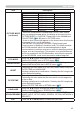
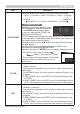
PICTURE MODE
Using the ◄/► buttons switches the picture mode.
The picture modes are combinations of GAMMA and COLOR TEMP
settings. Choose a suitable mode according to the projected source.
NORMAL
Ù
CINEMA
Ù
DYNAMIC
Ù
BOARD(BLACK)
Ú
Ú
DICOM SIM.
Ù
DAYTIME
Ù
WHITEBOARD
Ù
BOARD(GREEN)
(continued on next page)
(continued on next page)