
- HITACHI USER'S GUIDE Liquid Crystal Projector CP-S860W/E



15
VIDEO
STANDBY/ON
RGB
POSITION
LASER
MENU
RESET
MAGNIFY
FREEZE
OFF
VOLUME
P in P MUTE
AUTOBLANK TIMER
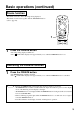
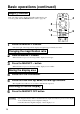
Freeze function
Basic operations (continued)
1
Press the FREEZE button.
• The image being displayed will freeze.
• The [ ] mark will be displayed for approximately 3 sec. when the FREEZE function is on.
1
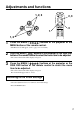
Press the FREEZE button.
• The FREEZE function will be cancelled.
• The [ ] mark will be displayed for approximately 3 sec. when the FREEZE function is cancelled.
1
This function is used to freeze the image being displayed.
This function can be used together with the MAGNIFY function
(refer to page 10).
Cancelling the FREEZE function
• Pressing the FREEZE button alternately turns the freeze function on and off.
• The FREEZE function will be cancelled when the input select button is pressed or the display
mode of the PC being used for display is changed.
• The POSITION icon is not displayed while the FREEZE function is being used. The screen cannot
be moved with DISK PAD.
• When a still image signal is input when the FREEZE function is on, make sure not to forget to
cancel the FREEZE function.
• Cancelled when the menu display is turned on during freeze operation.
Caution