
Operation Manual



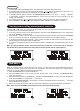

1. To s elect manual tune, press the MENU button to e nter into the “Setup menu”, when the display shows
“Manual tune”, press the JOG MODE/SELECT control once to confirm.(F7)
2. Rotate the JOG MODE/SELECT control to scroll through the DAB channels, the display will show “5A
to 13F ” and
their associated frequencies.
3. When your desired frequency appears in the display, press the JOG MODE/SELECT control to
confirm. The name of the station group
(ensemble/multiplex) will be displayed.
4. To see what stations are present on the found
ensemble/multiplex, first press the JOG MODE/SELECT
control once, and then
rotate the JOG MODE/SELECT
control, when your desired station appears in the
display, press the JOG MODE/SELECT control again to
select.
DAB manual tune
On some occasions you will see a “>” symbol appeared after the name of the station, this indicates that
there are secondary services available to that station. These secondary services contain extra services
that relate to the primary station. E.g. a sports station may want to add extra commentaries. The
secondary
services are inserted directly after the primary station.
To select the secondary station, press the JOG MODE/SELECT control when the “>” appears in the
display.
Secondary Services
There are two types of DAB auto scan modes, one is local scan and the other is full scan. Local scan will
only search for the UK DAB Band III channels and full scan will search for all DAB Band III channels. After
the scan has finished, the first alphanumerically found
station will be automatically selected.
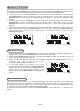
1. To activate local scan, press the MENU button once to enter into the “Setup menu”, then rotate the
JOG MODE/SELECT control for selection, when the display shows “Local scan”, press the JOG
MODE/SELECT control to confirm, the display will show “Scanning …” and
a quick progressing slide
bar.(F5)
2. To activate full scan, press the MENU button once to enter into the “Setup menu”, then rotate the JOG
MODE/SELECT control for selection, when the display shows “Full scan”, press the JOG
MODE/SELECT control to confirm, the display will show “Scanning …” and a
slower progressing slide
bar.(F6)
3. All the stations that have been found will be stored automatically, to explore the stations that have
been found, first press the JOG MODE/SELECT control once, then rotate the JOG MODE/SELECT
control for selection, when you find a station that you would like to
listen to, press the JOG
MODE/SELECT control.
DAB auto scan modes
UK-8
F5 F6
F7