
Operation Manual




CLOCK SET TING
The clock will be automatically synchronised to the DAB clock if you can receive DAB signals in your
location. If you can only receive FM, then you have to set the clock manually. The manual clock setting
must be done in standby mode.
1. When the unit is first connected
to the AC mains outlet, it will be in standby mode, and the display will
show “00:00” and flash.
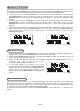
2. During standby, press and hold the CLOCK/DISPLAY button until the hour digits flash in the display,
press the PS/FOLDER + or PS/FOLDER - button to set to the correct
hour, then press the
CLOCK/DISPLAY button again to confirm.(F1)
3. After the hour is set, the minute digits will then flash, press the PS/FOLDER + or PS/FOLDER - button
to set to the correct minute.(F2)
4. When the display shows the correct time, press the CLOCK/DISPLAY button again
to confirm, the
manual clock setting is now completed.
Manual clock setting
1. Press the STANDBY/ON button once to switch the unit on.
2. Press the DAB/F M button to select DAB mode.
3. Tune to a DAB station and the clock will be automatically synchronised to the DAB local time.
Synchronise the clock to DAB local time
This unit carries a single lead wire DAB/FM antenna, to obtain the best performance, you should fully
extend the wire antenna and adjust the position as well as the direction until you find the best reception.
For ideal DAB r eception, always maintain the lead wire antenna in a vertical position (holding it upward or
downward behind the unit) is highly recommended.
When the unit is powered up for the first time, it will be in standby mode. Press the STANDBY/ON button
once to turn the radio on, it will then automatically enter into the DAB mode and perform full scan
function.
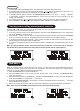
During scan, the display will show “Scanning …” together with a slide bar that indicates the
progress of the scan and the amount of stations that have been found so far.(F3)(F4)
Once the scan has finished, the radio will select the first alphanumerically found station. To explore the
found
stations, first press the JOG MODE/SELECT control and then rotate the MODE/SELECT control
for selection, when your desired station appears on the display, press the JOG MODE/SELECT control
again to confirm your selection.
Hints for better reception
DAB mode
LISTENING TO YOU R RADIO
UK-7
F1 F2
F3 F4