
Operation Manual







UK-14
SLEEP FUNCTION (remote control only)
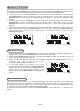
This function allows you to program the system to switch off itself after a set period of time. You can set
your sleep time in power on mode:
1. To activate the sleep function, press the SLEEP button on the remote, the display will show “SLEEP-
90” and flash.
2.
R epeatedly press the SLEEP button to select the sleep time, it will change in sequence on every
press:
3. When the display shows your desired sleep time, release the
button, the sleep timer is now activated. The display will show
“S#” in which “S1” is to indicate “10 minutes”
sleep time and
so on. When the sleep time counts to zero, the unit will go
off.(F22)
4. To cancel sleep, press the SLEEP button once again, the
display will show “SLEEP-OFF ” and the “S#” will disappear.
80
70 50 40 30 10
90
60
20
OFF
F22
TIMER FUNCTION
This function allows you to switch on and off the system at your desired time and mode:
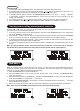
1. Press the TIMER button to toggle the timer function between on and off, the display will show “Timer
On” or “Timer Off ”. The display will show “ ” to
indicate timer function on.(F23)
2. To set the on timer clock, press and hold the TIMER button until the display shows “On Timer” and the
“hour” digit of the timer clock will flash.(F24)
3. Press the PS/FOLDER + or PS/FOLDER - button to set to the desired hour, then
press the TIMER
button to confirm, the minute digits will then flash, press PS/FOLDER + or PS/FOLDER - button to set
desired minutes, press TIMER button to confirm, the on timer clock is set.
4. Then you will enter into the off timer clock setting, the display will show
“Off Timer” and the “hour”
digit will flash. Press the PS/FOLDER + or PS/FOLDER - button to set to the desired hour, then press
the TIMER button to confirm, the minute digits will then flash, press PS/FOLDER + or PS/FOLDER -
button to set desired minutes, press TIMER button to confirm
, the off timer clock is set.
5. Finally press the PS/FOLDER + or PS/FOLDER - button to select the timer on mode - CD, SD CARD,
USB, FM, DAB, iPod or AU X , then press the TIMER button to confirm. The timer setting is now
completed.
6. To check the
timer setting, repeatedly press the DISPLAY button until the display shows the on timer
and the off timer setting.
F23 F24
PRESET EQ
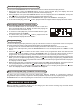
Press the EQ button to select different preset EQ mode, the display will show in sequence of every press:
ROCK CLASSIC
JAZZ
FLAT
POP
SURROUND SOUND (remote control only)
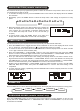
Press the SURROUND button on the remote control will toggle this function between on and off. The
display will show “SURROUND ON” or “SURROUND OFF”. When the SURROUND is on, the surround
sound effect is activated.