
Operation Manual







LISTENING TO YOU R COMPACT DISCS
NOTE : Although this CD/MP3 player can read CD-R and CD -RW discs in addition to normal CDs,
the playability of CD-R and CD -RW discs may be affected by the type of software that was used to
create the discs, as well as the quality and condition of the blank media you are using, 100%
playability cannot be guaranteed. This is not an indication of a problem with the player.
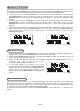
1. When the unit is ON, press the iPod/CD button to select CD function. The display will first show “CD”
and then finally “NO DISC ” to indicate that there is no disc
in the player(F12)(F13).
2. Press the OPEN/CLOSE button to open the CD door, the display will show “OPEN”.
3. Load the disc with the printed label side facing up and then press the OPEN/CLOSE button to close
the CD door. The display will first show “READING” and
then finally the total track number and time
will be displayed.
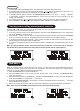
4. If a n ormal CD is being loaded, the display will show “CDDA”. If a MP3 disc is being loaded, the display
will show .(F14)(F15)
5. To start playback from the beginning, press the
button.
6. To interrupt playback, press the button again, the display will show “II” and the elapsed time in the
display will flash.
7. To resume playback, press the button again.
8. To stop playback, press the button, the
display will show “STOP”.
the total number of folders and tracks
Playing the entire CD
F15
F12
F13
F14
Selecting a different track during play
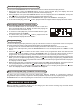
1. During playback, press on the JOG MODE/SELECT control once, when the display shows “← Tra ck
→”, rotate the JOG MODE/SELECT control until you read your desired track in the display and
playback will be started from this track.
2. If a MP3 disc is being played, press on the JOG MODE/SELECT control once to select a track and
twice to select a folder, when
the display shows “← Folder →”, rotate the JOG MODE/SELECT control
to select other folders.
3. Yo u can also press the or button to select your desired track.
4. To play the next track, press the button once.
5. To play the current
track again from the beginning, press the button once.
6. To play the previous track, press the button twice.
UK-11
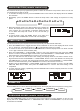
F16 F17
During normal playback, you can press the REPEAT button on the remote control to select the repeat play
function:
1. To repeat the same track, press REPEAT button once, the display will show “ 1”.(F16)
2. If you are playing a MP3 disc, an additional
“ ” option will appear. This will repeat the current folder.
3. To repeat the entire disc, press the REPEAT button again, the display will show “ ”.(F17)
4. To cancel repeat play, press the REPEAT button until “NORMAL” appears in
the display.
Repeat play (remote control only)