
User Guide



- 21 -
Turk/Gre or Arabic. This will normally be set
to West for Western Europe.
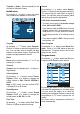
Install menu
By pressing
_
/
`
button, select the fourth
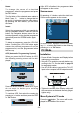
icon. Install menu appears on the screen.
Program
By pressing
a
/
b
button, select Program.
Press
_
/
`
button to select the program num-
ber. You can also enter a number via digit
buttons on the remote control. There are 100
program storage between 0 and 99.
Band
Band can be selected either C or S by
pressing
_
/
`
button.
Channel
Channel can be changed by
_
/
`
button or
Digit Buttons.
Colour System
By pressing
a
/
b
button, select Colour
System. Press
_
/
`
button to change the
colour system to PAL, PAL60, SECAM or
AUTO.
Note: In EXT mode, you can choose NTSC
3.58 and NTSC 4.43 as well.
Sound System
By pressing
a
/
b
button, select Sound
System. Press
_
/
`
button to change the
sound system to BG, DK, I or L/L.
Fine Tune
By pressing
a
/
b
button, select Fine Tune.
Press
_
/
`
button to adjust the tuning.
Search
By pressing
a
/
b
button, select Search.
Press
_
/
`
button to start program searching.
The searching will stop when a signal is
found. You can also enter a frequency value
directly by pressing the digit buttons.
VCR (Video Cassette Recorder)
This item can be seen in all modes except
AV-3, AV-5 and PC RGB.
If you want to watch a VCR source from one
of these modes, then it will be better to set
VCR mode on. For this, while the cursor is
on this item press the
_
/
`
buttons to set it
On.
If you want to watch a DVD , then you must
set this item off.
Store Program
By pressing
a
/
b
button, select Store Pro-
gram. Press
_
/
`
or OK button to store the
adjustments. Program Stored will be dis-
played on the screen.
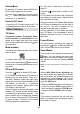
Program menu
By pressing
_
/
`
button, select the fifth icon.
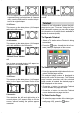
Program menu appears on the screen.
By moving the cursor in four directions you
can reach 20 programmes in the same page.
You can scroll the pages up or down by
pressing the navigation buttons to see all the
programmes in TV mode (except the AV
mode).
By cursor action, programme selection is
done automatically.