
User Guide



52
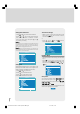
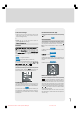
Selecting Programme
To select programme number, you can use “ ” or
“ ” key, Digit Keys or The Double Digit key with digit
keys.
Install.
P 02 C-36 C 36 252
Selecting Band
Band, can be chosen either,
• “C” or “S” by “ ” or “ ” key..
Selecting Channel
Channel can be changed by “ ” or “ ” key, by
Digit Keys or by the Double Digit key with digit keys.
For band C,
01 - 83, WEST EUROPE.
01 - 12, 21 - 69, EAST EUROPE .
01 - 17, 21 - 73, UK.
01 - 76, FRANCE.
04 - 09, FRANCE 2.
For band S,
01 - 41, for all channel tables.
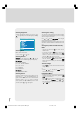
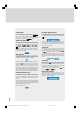
Selecting Search
To start the search process, press “ ” key for for--
ward search or “ ” key for backward search. If a
signal is found or reaches to end of the band after
searching, press “ ” or “ ” keys to continue
search process. To stop the search process when
you want, press “ ” or “ ” keys again.
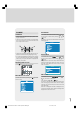
Selecting Fine Tuning
You can use the Fine Tuning process for fine adjust-
ment (after coarse adjustment), if you are not happy
about the image on the screen.
Use “ ” or “ ” key on Fine Tuning item, until get--
ting the best image on the screen.
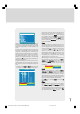
Normally the Fine Tuning cursor is placed next to the
left side on the slider and this is indicated with one ar-
row.
Setting VCR ( Video Cassette Recorder )
Mode
• This item can be seen in TV, AV-1, AV-2, AV-3, S-
VIDEO modes.
• If you want to watch a VCR source from one of
these modes, then it will be better to set VCR
mode “on”. For this, while the cursor is on this item
press the “ ” or “ ” keys to set it “On”.
• If you want to watch a DVD , then you must set this
item “off”; because DVD is not a source like a VCR
and to see the picture better, you must set the VCR
mode “Off”.
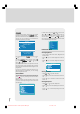
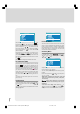
To Store Settings
• Press “OK” key on the remote control to store the
settings directly.
or,
• Press “ ”, “ ” or “OK” key on Store option to
store Install menu settings.
Programme Menu
• To enter Programme menu directly, press the "
INFO" key in TV mode, or
• Press "M" key, now you are in main menu. In the
main menu, select “Program.” using “ ” or “ ”
key. Then enter the Programme menu, press “ ” /
“ ” or “OK” key..
1549 UK-IDTV TV-DVB-22'' TFT IB-2-(Revised - 19x27).p6501.12.2004, 13:4952