
User Guide



51
Feature
Off
Once the time set with the sleep timer has elapsed, the
set will go to standby.
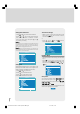
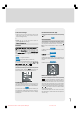
Child Lock
You can use this feature to prevent children turning on/
off TV or changing programmes or adjustments etc.
without remote control.
The Child Lock feature can be set On or Off by
“ ” or “ ” key. When Off is selected, there will be
no difference in the operation of your TV. When On is
selected, the TV can only be controlled by the remote
control handset. In this case the control panel keys at
the top of the TV will not work.
Feature
Off
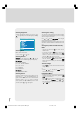
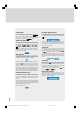
Selecting Menu Language
Menu language can be chosen by pressing “ ” or
“ ” key on Language item.
Feature
English
Av-2 Output
From Av-2 Output; DIGITAL, TV, AV-1 or AV-3 can be
given. DIGITAL, TV, AV-1 or AV-3 can be chosen by
pressing “ ” or “ ” key on "Av-2 Output".
Feature
TV
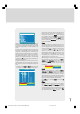
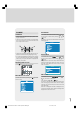
PC Sound Mode
PC sound can be chosen by pressing “ ” or “ ”
key on PC Sound Mode item.
You can select sound that comes from TV, AV-1, AV-
2, AV-3 or PC to hear in PC mode.
Feature
PC
To Store Settings
In Feature menu all settings are stored automatically.
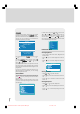
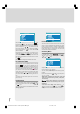
Installation Menu
• To enter the Installation menu directly, press the
Blue key, or
• Press "M" key, now you are in main menu. In the
main menu, select “Install.” using “ ” or “ ” key..
Then enter the Install menu pressing “ ” / “ ” or
“OK” key.
Menu
When any item is selected with “ ” or “ ” key in the
install menu, the selected item will be highlighted on
the bottom bar. Changes by pressing “ ” or “ ”
key will be result only at highlighted item on the bot-
tom bar.
1549 UK-IDTV TV-DVB-22'' TFT IB-2-(Revised - 19x27).p6501.12.2004, 13:4951