
User Guide



50
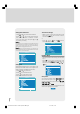
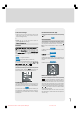
Setting Noise Reduction
• Using “ ” or “ ” key select Noise Reduction.
• Press “ ” or “ ” key to select Noise Reduction
level “Off” or “Minimum” or “Medium” or “Maxi-
mum” then select “store” and press “ ” or “ ”
key to save your setting.
Note 1:
At low signal level, the changings on the Noise Reduction function
are not effective when there is menu on the screen. If the menu is re-
moved, the effect of this function is seen. At normal broadcasting,
Noise Reduction changings are effective at once.
Note 2:
At moving pictures, while Noise Reduction is at maximum level,
some picture distortions may occur. If Noise Reduction is set to medi-
um or minimum, the picture will improve.
Picture
Medium
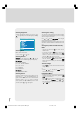
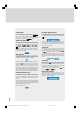
Setting Hue
(During Playback NTSC system, this will appear in AV
mode only when NTSC video source is applied. Oth-
erwise, HUE option is invisible in Picture menu.):
• Using “ ” or “ ” key select Hue.
• Press “ ” key to increase hue level.
• Press “ ” key to decrease hue level.
Center value is indicated with one arrow.
Picture
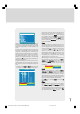
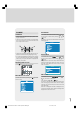
To Store the Settings
• When the cursor is on any item which has no sub-
menu press “OK” key on the remote control to
store the settings directly.
or,
• Press “ ”, “ ” or “OK” key on Store option to
store Picture menu settings.
Picture
Stored
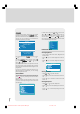
Feature Menu
• To enter the Feature menu directly, press the Yellow
key, or
• Press "M" key, now you are in main menu. In the
main menu, select Feature using “ ” or “ ” key..
Then enter the Feature menu pressing “ ” / “ ” or
“OK” key.
Menu
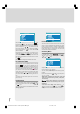
Sleep Timer
As you enter the Feature menu, Sleep Timer will be
the first selected option. Use “ ” or “ ” key to
change the Sleep Timer values between Off, 0:15,
0:30, 0:45, 1:00,
1:15, 1:30, 1:45 and 2:00.
If sleep timer is activated it is displayed with the TV
status on the upper right of the screen.
0:15
1549 UK-IDTV TV-DVB-22'' TFT IB-2-(Revised - 19x27).p6501.12.2004, 13:4950