
User Guide



49
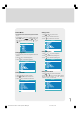
Picture Menu
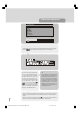
• To enter the Picture menu directly, press the Green
key, or
• Press "M" key, now you are in main menu. In the
Main menu, select “Picture” using “ ” or “ ” key,,
then enter the Picture menu pressing “ ” / “ ” or
“OK” key.
Menu
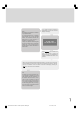
Setting Brightness
• As you enter the picture menu, Brightness will be the
first item.
• Press “ ” key to increase brightness.
• Press “ ” key to decrease brightness.
Picture
Setting Contrast
• Using “ ” or “ ” key select Contrast.
• Press “ ” key to increase contrast level.
• Press “ ” key to decrease contrast level.
Picture
Setting Colour
• Using “ ” or “ ” key select Colour..
• Press “ ” key to increase colour level.
• Press “ ” key to decrease colour level.
Picture
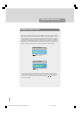
Setting Sharpness
• Using “ ” or “ ” key select Sharpness.
• Press “ ” key to increase peaking level.
• Press “ ” key to decrease peaking level.
Picture
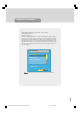
Setting Picture Mode:
• Using “ ” or “ ” key select Picture Mode.
• Press “ ” or “ ” key to set Picture Mode. Picture
Mode can be set to Auto, 4:3, 16:9, Cinema,
Subtitle, Zoom or Panorama.
Picture
4:3
1549 UK-IDTV TV-DVB-22'' TFT IB-2-(Revised - 19x27).p6501.12.2004, 13:4949