
User Guide



48
In case of bilingual broadcast, you can select original
or dubbed language again using mode menu. So
when somebody listens to the original language from
the loudspeakers, somebody else can listen to the
dubbed language from headphone.
To Store the Settings
• Press “OK” key on the remote control to store the
settings directly.
or,
• Using “ ” or “ ” key select Store. Press “ ”,
“ ” or “OK” key to store current headphone vol-
ume and sound mode. The stored values will be
valid for all the programmes.
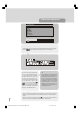
Equalizer
• Using “ ” or “ ” key select Equalizer..
• Press “ ” or “ ” key or directly press “OK” key
to enter Equalizer sub-menu.
Sound
Equalizer . . .
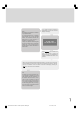
In Mode item there are five predefined and one user
defined options. These are User, Classic, Jazz, Rock,
Pop and Flat. The predefined options can not be
changed by the user. If you want to change one of the
frequency values of the predefined options, the Mode
must be switched to User option.
The 5 items below the Mode are available to adjust
the sound settings in 5 frequency values: 120 Hz, 500
Hz, 1.5 kHz, 5 kHz and 10 kHz. To change the values
of 5 frequency options, select one of the options by
“ ” or “ ” key, and then press “ ” key to increase
the value, or “ ” key to decrease the value. In mid
position, cursor is displayed with one arrow.
To store the Equalizer settings, press “ ” or “ ”
key or directly press “OK” key on “Store” option.
The settings will be stored and you can recall them by
selecting "USER" in the MODE item.
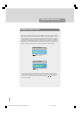
Setting AVL
• Using “ ” or “ ” key select AVL.
• Pressing “ ” or “ ” key will turn on and off this
feature.
Automatic Volume Limiting (Avl) function normalises
sound to obtain fixed output level between pro-
grammes, having different sound levels.
Sound
On
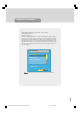
To Store the Settings
• When the cursor is on any item which has no sub-
menu press “OK” key on the remote control to
store the settings directly.
or,
• Press “ ”, “ ” or “OK” key on “Store” option to
store Sound menu settings.
Sound
Stored
1549 UK-IDTV TV-DVB-22'' TFT IB-2-(Revised - 19x27).p6501.12.2004, 13:4948