
User Guide



44
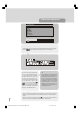
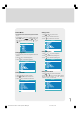
Figure 6. Module Inquiry (this list is identical for the Viaccess Common
Interface Module)
LANGUAGE
Digital terrestrial television channels can broadcast simultaneous soundtracks in more
than one language. This function selects which language soundtrack you will hear when
switching to a channel broadcasting with multiple soundtracks.
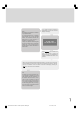
The Language menu screen is accessed from the Main Menu. Press the “M” key to
display the Main Menu and the “ ” key to highlight Language, then press “SELECT”
key to display the Language menu screen.
Then, using the “ “ or “ ” keys on the remote control, make sure that the selected
language is highlighted in yellow and press the “SELECT” key to change the lan-
guage.
Return to the Main Menu by pressing the “M” key.
advanced operation
TV SETUP:
To be able to go through TV menu functions, you can use this item.
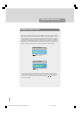
The digital TV setup menu screen is accessed from the main menu. Press the “M” key
to display the main menu and use the “ ” key to highlight TV Setup, press “SE-
LECT” key to display TV Setup menu screen.
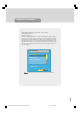
Common Interface
Please, enter your PIN code
? ? ?
1549 UK-IDTV TV-DVB-22'' TFT IB-2-(Revised - 19x27).p6501.12.2004, 13:4844