
User Guide





35
advanced operation
A channel can have its favourites status removed by repeating this proce-
dure, to remove the icon. Leave the Channel List menu by pressing “M”
key.
Once the required channels have been marked as favourite channels, the favourite
mode can be activated to allow easy access to them. Press the “M” key to
display the Main Menu, the “ ” key twice to highlight Configuration, and press
“SELECT” key to display the Configuration screen. Press the “ ” key two times
to highlight the Favourite Mode line and using the “ “ or “ ” keys change the
setting from Off to On.
When you leave the Configuration menu by pressing “M” key the favourite mode is
activated. Now, changing channel using the “P/CH+” or “- P/CH” keys will switch
to only those channels marked as favourites in the channel list. Similarly, the on-
screen list in the electronic programme guide contains only the favourite channels.
You can still access all the channels in
the channel list by keying in their chan-
nel list number or by selection from
the Channel List screen. Alternatively
you can switch off the favourite mode
from the Favourite Mode line of the
Configuration menu.
Hint
The favourite mode can only be
activated if one or more channels
in the channel list are marked as
favourites. Similarly, if the favourite
status is removed from all the
channels in the Channel List, the
favourite mode is turned off auto-
matically.
PROGRAMME REMINDERS AND TIMERS
With the greatly extended channel choice that digital terrestrial television brings, it is
all too easy to miss a favourite programme. The TV has two facilities built in to help
you make sure you catch all the TV shows you want.
PROGRAMME REMINDERS
Programme reminders can be set to signal that a programme is about to start
when you are watching another channel. A reminder is set from the Electronic
Programme Guide screen.
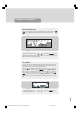
Press the “GUIDE” key to display the EPG screen and press “ ” key to display
the next programme details in the text window and highlight the name of the next
programme in the list of channels. Press “SELECT” key when a programme you
want to watch is highlighted and the reminder icon is displayed against that pro-
gramme's name. You can exit the EPG screen in the normal way - pressing
“GUIDE” key or “M” key. Later, shortly before the programme is due to start,
the TV will display a reminder on the screen over the picture of the channel being
viewed.
Use the “ “ or “ ” keys to highlight the YES or NO buttons as appropriate and
press “SELECT” key. If you select the YES button, the TV switches over to the re-
minder channel.
1549 UK-IDTV TV-DVB-22'' TFT IB-2-(Revised - 19x27).p6501.12.2004, 13:4835