
User Guide



26
IDTV UPGRADE
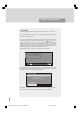
The IDTV can be upgraded via the configuration menu, entered from the main menu.
In the configuration menu, there is the "IDTV Upgrade" button. Upgrade process can
be started by pressing this button.
There are two possibilities for IDTV software to be upgraded: automatic and manual.
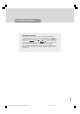
Automatic upgrade can be enabled or disabled by pressing “ “/“ ” buttons. If it is
enabled, then there are two ways for automatic upgrade. The first one is checking the
existence of a new software every time the IDTV goes to standby. The second one is
waking up at 03:00 a.m. every night, provided that the IDTV is left in standby mode.
Both automatic upgrade methods result in standby mode either upgraded or not. If the
automatic upgrade is set to 'Disable' then this function will not work.
Manual upgrade starts if the 'Search for New Version' button is pressed.
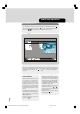
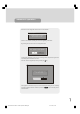
After pressing the 'Search for New Version' button, the IDTV tunes to each frequency
that have been stored in its database and looks for the new software. Since this pro-
cess takes some time, a warning message is displayed.
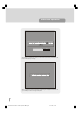
Depending on the existence of a new software, two different messages can appear on
the screen: 'No new software was found’ or 'New software found! Upgrade?'
advanced operation
MENU
i
Automatic Download
Search for New Version
Enabled
Software Upgrade
Search Progress:
Searching for upgrade. Please wait, or
press MENU to cancel.
1549 UK-IDTV TV-DVB-22'' TFT IB-2-(Revised - 19x27).p6501.12.2004, 13:4826