
User Guide





17
everyday operation
If the selected channel is locked (see
Advanced operation- Channel pro-
tection), you must enter the correct
four digit code to view the channel.
Alternatively, the “P/CH+“ or “- P/
CH” keys are used to move to an-
other, unlocked channel.
CHANNEL LIST
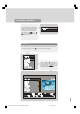
You can also select the required channel directly from the on-screen channel list.
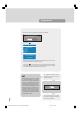
First bring up the menu with the “M” key on the remote control handset.
Using the “ “ or “ ” keys on the re-
mote control, make sure that the first
item, Channel List, is highlighted in yel-
low and press the “SELECT” key, to
display the channel list.
*
SELECT
i
1549 UK-IDTV TV-DVB-22'' TFT IB-2-(Revised - 19x27).p6501.12.2004, 13:4817