
User Guide







- 16 -
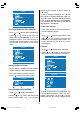
Av-2 Output
From Av-2 Output; TV, AV-1 or AV-3 can be
given. TV, AV-1 or AV-3 can be chosen by
pressing
or button on "Av-2 OUT-
PUT".
)HDWXUH
79
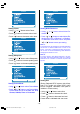
PC Sound Mode
PC sound can be chosen by pressing
or
button on PC Sound Mode item.
You can select sound that comes from TV,
AV-1, AV-2, AV-3 or PC to hear in PC mode.
)HDWXUH
3&
To Store Settings
In Feature menu all settings are stored auto-
matically.
Installation Menu
To enter the Installation menu directly, press
the Blue button, or
Press "M" button, now you are in main
menu. In the main menu, select Install.
using
or button. Then enter the In-
stall menu pressing
/ or OK but-
ton.
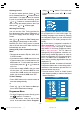
0HQX
When any item is selected with or
button in the install menu, the selected item
will be highlighted on the bottom bar.
Changes by pressing
or button will
be result only at highlighted item on the bot-
tom bar.
Selecting Programme
To select programme number, you can use
or button, Digit Buttons or The
Double Digit button with digit buttons.
,QVWDOO
3&&,
Selecting Band
Band, can be chosen either,
C or S by
or button.
Selecting Channel
Channel can be changed by
or but-
ton, by Digit Buttons or by the Double Digit
button with digit buttons.
For band C,
01 - 83, WEST EUROPE.
01 - 12, 21 - 69, EAST EUROPE .
01 - 17, 21 - 73, UK.
01 - 76, FRANCE.
04 - 09, FRANCE 2.
For band S,
01 - 41, for all channel tables.
Selecting Standard
The "Standard" setting is fixed to "I". You
cannot change this item's setting.
ENG-2200-1547UK-22 INCH TFT IB.p65 03.03.2004, 17:5916