
User Guide







- 15 -
3LFWXUH
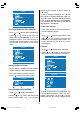
To Store the Settings
When the cursor is on any item which has
no sub-menu press OK button on the re-
mote control to store the settings directly.
or,
Press
, or OK button on Store op-
tion to store Picture menu settings.
3LFWXUH
6WRUHG
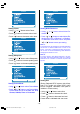
Feature Menu
To enter the Feature menu directly, press the
Yellow button, or
Press "M" button, now you are in main
menu. In the main menu, select Feature us-
ing
or button. Then enter the Feature
menu pressing
/ or OK button.
0HQX
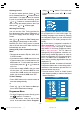
Sleep Timer
As you enter the Feature menu, Sleep Timer
will be the first selected option. Use
or
button to change the Sleep Timer val-
ues between Off, 0:15, 0:30, 0:45, 1:00, 1:15,
1:30, 1:45 and 2:00.
If sleep timer is activated it is displayed with
the TV status on the upper right of the
screen.
)HDWXUH
2II
Once the time set with the sleep timer has
elapsed, the set will go to standby.
Child Lock
You can use this feature to prevent children
turning on/off TV or changing programmes
or adjustments etc. without remote control.
The Child Lock feature can be set On or Off
by or button. When Off is selected,
there will be no difference in the operation of
your TV. When On is selected, the TV can
only be controlled by the remote control
handset. In this case the control panel but-
tons at the top of the TV will not work.
)HDWXUH
2II
Selecting Menu Language
Menu language can be chosen by pressing
or button on Language item.
)HDWXUH
(QJOLVK
ENG-2200-1547UK-22 INCH TFT IB.p65 03.03.2004, 17:5915