
User Guide




- 19 -
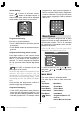
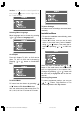
By moving the cursor in four directions, you
can reach 20 programmes in the same
page. By scrolling the pages up or down by
pressing the navigation buttons you can se-
lect all the programmes in TV mode (except
the AV mode).
By cursor action, programme selection is
done automatically. It is also possible to se-
lect programme by using digit or double-
digit button. In this way programme selec-
tion is also automatic. The TV Status is
changed by the programme selection too.
When using double-digit button in order to
select a programme, the Programme Num-
ber in TV Status OSD is displayed in "P --"
form, and by pressing digit buttons they are
displayed in it.
Programme Number is between 00 and 99.
Programme Name has a name string with 4
characters. After autostore process the Pro-
gramme Names are set to:
Channel search "C-01" or "S-01" (band
and channel number) or name of the tuned
channel if defined.
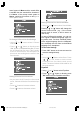
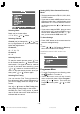
At the bottom of the menu there is a pro-
gramme sort functions section. Each func-
tion is activated by coloured button (seen
above). Name allows changing the pro-
gramme name. By Delete you can delete
programmes that you do not require. Insert
section is for inserting programmes into an-
other programme spaces. By selecting
Autostore section, Autostore menu will be
available.
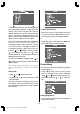
Name:
To change the name of a programme, se-
lect the programme and then press the RED
(Name) button. The first letter begins to blink
on the selected name. To change that letter
or button can be used, and to select
the other letters,
or button can be
used. If the cursor is at the last letter of the
Programme Name, pressing
button
moves the cursor to the beginning. On the
contrary, if the cursor is at the beginning of
the Programme Name, pressing
button
moves the cursor to the end.
After changing the name press the RED
(Store) button. After activating the name
process the Insert, Delete and
Autostore processes will be inactive and
"Cancel" option will be valid. If you do want to
store the new name, press the BLUE
(Cancel) button.
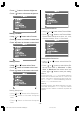
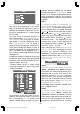
Insert:
When the Green (Insert) button is pressed,
"Name", "Autostore" and "Delete" functions
are erased, the selected programme (A) is
displayed with an arrow. From now on, the
automatic selection is cancelled. With navi-
gation buttons, the decided programme
space (B) can be selected and by pressing
the green button again the selected
programme will be inserted.
Press Blue button to activate "Cancel" func-
tion of "Insert" process.
Delete:
To start the "Delete" process, press the yel-
low "Delete" button, (Name, Insert and
Autostore functions are inactive). Pressing
yellow button again erases the selected pro-
gramme from the programme list, and the
programmes below shift one up. Pressing
ENG-1700W-1547UK-17 INCH TFT-WM-17LD4220U.p65 01.12.2004, 14:1319