
User Guide





8
ENGLISH
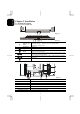
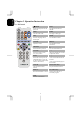
Chapter 3 Operation Instruction
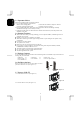
3.1 IR Control
POWER
TEXT
Switch between power-on and
power-off.
Turn the Teletext function
ON/OFF
MUTE INDEX
Turn the sound on/off. Turn page to index page.
MPX MODE
Select the language and the
sound output
Turn ON/OFF list mode.
VOLUME REVEAL
Adjust the volume. Turn ON/OFF conceal
information
CHANNEL
Select channels up or down. Turn on/off the OSD menu.
TV/AV/PC ← →
Select input sources of TV,
AV1, AV2, and PC.
Adjust the selected item on menu
or adjust the volume.
SLEEP ↑ ↓
Select timer to turn power off.
The default timer is 10, 20, 30,
40, 50, 60, and 90 minutes (Only
enable in TV function).
* Press to select desired item on
the menu
* Press to select desired page on
the text mode
LAST CH Teletext colour Keys
Turn back the last select
channel.
For special teletext functions
DISPLAY 0~9 Number Keys
Show the information on screen. Used to select cable TV or
Terrestrial programs.
WIDE
Select the screen format.