
User Guide



14
ENGLISH
NICAM
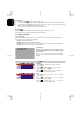
1. Press "MENU" (on main body) or "►" (on remote
control) button.
2. Press "
" (on main body) or "→" (on remote
control) button to select SYSTEM.
3. Press "
" (on main body) or "↑, ↓" (on remote
control) button to select NICAM.
4. Press "
" (on main body) or "←, →" (on remote
control) button to select ON or OFF. You can select ON
if your set is equipped with the receiver for NICAM
reception. The high quality NICAM
(
N
ear
I
nstantaneous
C
ompanded
A
udio
M
ultiplex)
digital sound can be
received.
3.2.2 PC settings
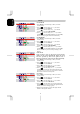
The OSD shown below displays when you press "MENU"(on main body) or "►" button (on remote
control).
To adjust the picture brightness.
1. Press "
" (on main body) or "↑, ↓" (on remote control) button to
select item.
2. Then press "
" (on main body) or "←, →" (on remote control)
button to adjust brightness.
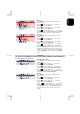
You can display a sub picture in the PC screen which can be selected
from TV or external A/V devices such as VCR or DVD. In this way you
can watch a TV program or monitor the video input from any connected
devices whilst looking at the display from the PC.
1. Press "
" (on main body) or "↑, ↓" (on remote control) button to
select item.
2. Choose “PIP”, then press "MENU" (on main body) or "►" (on remote
control) to enter second page. There are five options to set the PIP
preference.
SOURCE: To select the picture source from TV, AV1, AV2 or to turn
off PIP mode.
AUDIO: To select sound from PC (MAIN) or Video (SUB).
MUTE: To turn the sound on or off of the picture window.
SCALE: To choose between 4 picture sizes.
H-POS: To move the picture window left or right.
V-POS: To move the picture window up or down.
3. After finishing adjustment, press "MENU" (on main body) or "►" (on
remote control) retune to main menu.
S: When an image of TV, AV1 or AV2 is displayed in PIP mode, the
picture may appear to be a little stretched.
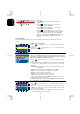
To adjust the colour temperature.
1.Press "
" (on main body) or "↑, ↓" (on remote control) button to
select item.
2.When you choose the user mode in colour temperature, then press
"MENU" (on main body) or "►" (on remote control) to enter second
page to adjust the R, G, B.
3.After finishing adjustment to press “MENU” (on main body) or "►"
(on remote control) retune to main menu.