
User Guide






- 16 -
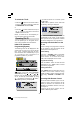
store
Press / button to select store. By
pressing
button, you can store the pro-
gram settings.
You can also store a setting by pressing
OK button on the selected setting.
STORED is displayed on screen when a
program is stored.
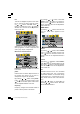
frequency
By pressing
/ button, select fre-
quency. Press
button to select the first
digit and digit buttons on remote control to
enter the frequency you want. After the fre-
quency is adjusted, press
button to exit.
fine tuning
By pressing
/ button, select fine tun-
ing. Press / button to change the fre-
quency value.
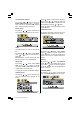
program skip
Use this feature after you run A.P.S. to skip
unwanted programs.
By pressing
/ button, select program
skip. Press / button to select on or
off. When on is selected, current program
cannot be reached by pressing -P/CH or P/
CH+ button. But digit button can be used to
reach it.
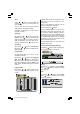
program table
By pressing
/ button, select the sec-
ond icon. Program table appears on the
screen.
Program table shows the programme num-
bers and the names assigned to the
programmes.
Here you can adjust the channel order by
moving or deleting the channels.
First of all press the button.
Using the GREEN button you can move a
programme into another programmes loca-
tion. Press the direction buttons to select a
programme and press the GREEN button.
Then select another programme and press
the GREEN button again. The first selected
programme moves into the location of the
second selected programme.
Using the RED button you can delete any
programme you want.
A.P.S. (Auto Programming System)
By pressing
button, select the third icon.
A.P.S. menu appears on the screen.
country
By pressing / button, select country.
Press
/ button to select the country
where you are.
A.P.S.
By pressing
/ button, select A.P.S.
When
button is pressed, the following
warning is displayed.
(1*/,6+8.LQFK3L[HO:RUNV0%6$0:0S