
Smartphone App User's Manual

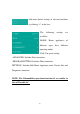






22
The appliance is not in
“Pair” mode.
"P2";
For Portable AC: click the
Vertical Airflow button 6
times on the remote and the
buzzer will sound 5 times ,
wait until the display shows
"77";
For Mini-Split AC, press
Horizon Airflow button 6
times on the remote and the
buzzer will sound 5 times ,
wait until the display shows
"77".
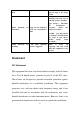
APP works abnormally
Close WiFi of smartphone
and then re-open it
Restart the smartphone
Incorrect password
Input correct password of
wireless router
Home appliance
operates abnormally
Power “Off” home
appliance for 10 seconds
and then restart it
The home appliance is
already paired on
another account
The original account holder
must share control of the
appliance
The home appliance is
offline all the time
The home appliance is
not powered on
Power “On” the home
appliance
The wireless router
cannot be connected to
the Internet normally
Contact your local Internet
Service Provider (ISP)
The wireless router is
out of range, or the
signal is weak.
Adjust the location of
wireless router or of the
appliance.
The home appliance
operates abnormally
Power “Off” the home
appliance for 10 seconds
and then restart it
App communication is
abnormal
Restart the App, or
dis-able and re-enable WiFi
on the smartphone
The home appliance is
not powered on
Power “On” the home
appliance
The wireless router is
not powered on
Power “On” the wireless
router
The Wireless router
supporting the home
Contact your local Internet
Service Provider (ISP)