
Smartphone App User's Manual







21
Troubleshooting the Hisense Hi-Smart Air
App
Check possible causes and solutions:
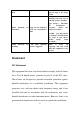
Issue
Possible Cause
Solution
Cannot log into the
account
Mobile phone WiFi is
disabled
Enable WiFi
Wireless router cannot
be connected to the
Internet
Contact your local Internet
Service Provider (ISP)
Account password is
wrong
re-enter password
The account isn’t active
Check whether the code in
registered mailbox has been
used
Password cannot be
reset through the
“Forgot password?”
function in login
interface
The account will be
frozen for 30 minutes if
the user fails to login to
the account after 5
attempts
Reset the password after 30
minutes
Cannot register to
become a member
The account name or
password is wrong
Please follow the prompt
Incorrect e-mail format
Register by correct e-mail
format
Home appliance cannot
be paired with the App
Home appliance is not
powered on
Power “On” the home
appliance
Wireless
communication signals
are weak because the
wireless router is out of
range
Adjust location of wireless
router or the appliance
Wireless network
cannot be connected to
the Internet
Contact your local Internet
Service Provider (ISP)
For Dehumidifier: press
"mode" and "fan" button
at the same time and the
buzzer will sound 3 times,
wait until the display shows