
User Manual

47
────────────────────────────────────────────────────
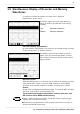
3.8 Simultaneous Display of Recorder and Memory Waveforms
────────────────────────────────────────────────────
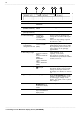
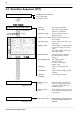
Top :Recorder waveform
Bottom :Memory waveform
NOTE
3.8 Simultaneous Display of Recorder and Memory
Waveforms
A recorder waveform and memory waveform can be displayed
simultaneously on the screen.
This allows trigger activation using memory to
analyze in detail an incident that occurs during
recording.
Use with memory segmentation
By using memory segmentation, you can divide an incident during recording
on the recorder into a set number of blocks.
The numbers shown on the recorder waveform
display at the top represent the number of times
data is loaded into memory blocks and the related
trigger positions.
Waveform scroll
When the blinking cursor is on the time axis or zoom for the memory waveform
at the bottom of the screen, or when the VIEW function is ON, the MEM
waveform can be scrolled. Otherwise, the REC waveform can be scrolled.
Search
Search will be performed on the MEM waveform. To search the REC waveform,
switch the screen for REC waveform display only.
The waveform print after measurement, numeric data print, and
A/B cursors are for MEM waveforms only.
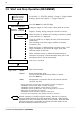
There is dead time between recorder startup and memory startup (trigger
standby) due to internal processing.
When memory segmentation has been performed, dead time occurs due to
display and interblock processing.