
User Manual

124
────────────────────────────────────────────────────
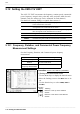
5.12 Setting the 8955 F/V UNIT
────────────────────────────────────────────────────
FREQ
Frequency is calculated using the input pulse that corresponds
to the measurement waveform.
RPM
Rotation speed is calculated using the input pulse that
corresponds to the measurement waveform.
P-FREQ
Commercial power frequency is calculated using the input pulse
that corresponds to the measurement waveform.
COUNT
Integrates the number of integrated input pulses.
DUTY
Calculates the duty ratio of measured waveforms.
WIDTH
Calculates the pulse width for measurement waveforms.
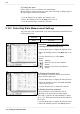
5.12.1 Frequency, Rotation, and Commercial Power Frequency
Measurement Settings
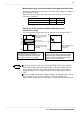
Object to be measured Measurement range
Frequency 0.1 Hz to 5k Hz
Rotation 10 r/min to 500 r/min
Commercial Power
Frequency Measurement
50 Hz / 60 Hz
Function
display
Meaning
:
Move the cursor up in the selection
window.
:
Move the cursor down in the selection
window.
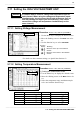
5.12 Setting the 8955 F/V UNIT
The 8955 F/V UNIT can measure the frequency, rotation speed, commercial
power frequency, integral value, pulse duty ratio, and pulse width for each
channel. (Only one setting type can be measured for each channel.)
For details on common settings, see Quick Start section 6.3.
Sets the Frequency, Rotation, and Commercial power frequency
measurement.
Procedure
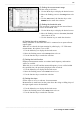
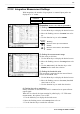
Screen: LIST, ONE CH (CHANNEL)
(1) Setting the measurement mode
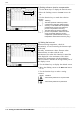
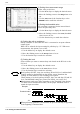
1. Use the Menu keys to display the desired screen.
2. Move the flashing cursor to the
Mode
item to be
set.
3. Use the function keys to select
FREQ
,
RPM
or
F-FREQ
.