
Operating Instruction R 6-22 (01)




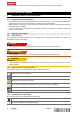


Table Of Contents
- Original operating instructions
- 1 Information about the documentation
- 2 Safety
- 3 Description
- 4 Technical data
- 5 Preparations at the workplace
- 6 Operation
- 6.1 Establishing a Bluetooth connection
- 6.2 Making an NFC connection
- 6.3 Setting the audio source
- 6.4 Searching for and saving stations
- 6.5 Positioning the antenna
- 6.6 Adjusting the volume
- 6.7 Equalizer settings
- 6.8 Audio playback from a mobile device via Bluetooth
- 6.9 Audio playback from an external device via AUX
- 6.10 USB charging function
- 7 Care and maintenance
- 8 Transport and storage of cordless tools and batteries
- 9 Troubleshooting
- 10 Disposal
- 11 Manufacturer’s warranty
- 12 FCC statement (applicable in US) / IC statement (applicable in Canada)
- 13 Further information
- Notice d'utilisation originale
- 1 Indications relatives à la documentation
- 2 Sécurité
- 3 Description
- 4 Caractéristiques techniques
- 5 Préparatifs
- 6 Utilisation
- 6.1 Établissement d'une connexion Bluetooth
- 6.2 Établissement d'une connexion NFC
- 6.3 Réglage de la source audio
- 6.4 Recherche et mémorisation d'émetteurs
- 6.5 Orientation de l'antenne
- 6.6 Réglage du volume sonore
- 6.7 Réglages de l'égalisateur
- 6.8 Lecture de musique depuis un terminal mobile via Bluetooth
- 6.9 Lecture de musique via une connexion AUX à partir d'un dispositif externe
- 6.10 Fonction de charge USB
- 7 Nettoyage et entretien
- 8 Transport et stockage des outils sur accu et des accus
- 9 Aide au dépannage
- 10 Recyclage
- 11 Garantie constructeur
- 12 Déclaration FCC (valable aux États-Unis) / Déclaration IC (valable au Canada)
- 13 Informations complémentaires
- Manual de instrucciones original
- 1 Información sobre la documentación
- 2 Seguridad
- 3 Descripción
- 4 Datos técnicos
- 5 Preparación del trabajo
- 6 Manejo
- 6.1 Preparación de la conexión Bluetooth
- 6.2 Establecimiento de la conexión NFC
- 6.3 Ajuste de la fuente de audio
- 6.4 Búsqueda y memorización de una emisora
- 6.5 Alineación de la antena
- 6.6 Ajuste del volumen
- 6.7 Ajustes del ecualizador
- 6.8 Reproducción de música de un terminal móvil mediante Bluetooth
- 6.9 Reproducción de música de un dispositivo externo mediante una conexión AUX
- 6.10 Función de carga USB
- 7 Cuidado y mantenimiento
- 8 Transporte y almacenamiento de las baterías y sus herramientas
- 9 Ayuda en caso de averías
- 10 Reciclaje
- 11 Garantía del fabricante
- 12 Indicación FCC (válida en EE. UU.)/indicación IC (válida en Canadá)
- 13 Más información
- Manual de instruções original
- 1 Indicações sobre a documentação
- 2 Segurança
- 3 Descrição
- 4 Características técnicas
- 5 Preparação do local de trabalho
- 6 Utilização
- 6.1 Estabelecer a ligação Bluetooth
- 6.2 Estabelecer a ligação NFC
- 6.3 Ajustar a fonte áudio
- 6.4 Procurar e guardar o emissor
- 6.5 Orientar a antena
- 6.6 Ajustar o volume
- 6.7 Ajustes do equalizador
- 6.8 Reproduzir música de um terminal móvel através de Bluetooth
- 6.9 Reproduzir a música através de uma ligação AUX a partir de um aparelho externo
- 6.10 Função de carga USB
- 7 Conservação e manutenção
- 8 Transporte e armazenamento de ferramentas a bateria e baterias
- 9 Ajuda em caso de avarias
- 10 Reciclagem
- 11 Garantia do fabricante
- 12 Declaração FCC (válida nos EUA) / Declaração IC (válida no Canadá)
- 13 Mais informações

6 English 2309425
*2309425*
Information shown in the display
The AM frequency band has been selected as the audio source.
The FM frequency band has been selected as the audio source.
AUX has been selected as the audio source.
Indicates the battery state of charge. A bar stands for 25 %.
The Bluetooth symbol indicates whether the appliance is connected to a
player. If the Bluetooth symbol lights continuously, a player is connected.
If the Bluetooth symbol flashes, the appliance is searching for a player with
which it can connect.
The pairing symbol indicates that the appliance is searching for a Bluetooth
device with which it has already been paired.
The pairing symbol flashes while searching is in progress.
Indicates the volume settings.
Indicates the bass settings.
Indicates the treble settings.
Indicates stereo playback. Stereo playback is activated automatically when
signal reception is good enough.
Indicates the memory slot of the station.
Indicates the time.
Symbols flash in setup mode.
3.7 Cradle for mobile devices 13
Via Bluetooth or AUX, the radio can play audio from external mobile devices (such as smartphones or tablet
computers). The mobile devices can be cradled securely on the radio.
4 Technical data
4.1 Product properties
Power input
160 W
Battery operating voltage
22 V
Battery pack
Li-Ion
Weight (Without battery)
5.1 kg
AM frequency range
526.5 kHz … 1,606.5 kHz
FM frequency range
87.5 MHz … 108 MHz
DAB / DAB+
174 MHz … 240 MHz
USB output voltage
5.0 V / 2.1 A
Ambient temperature
−17 ℃ … 40 ℃
4.2 Battery
Battery operating voltage
21.6 V
Weight, battery
See the end of these
operating instructions
Ambient temperature for operation
−17 ℃ … 60 ℃
(1 ℉ … 140 ℉)