
User guide




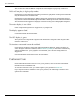

Figure 6–1 Connecting the Power Cables
1 Power supply
2 Existing card
3 New card
8. Fasten the graphics cards securely to the back panel.
9. Make sure the cables are not interfering with anything inside the computer (for
example, a cooling fan) and then replace the computer cover.
10. Reconnect any cables you have disconnected and plug in the computer power
cord.
11. Turn on the monitor and then the computer.
AMD CrossFireX™ Technology 19
© 2011 Advanced Micro Devices, Inc. AMD Radeon™ HD 6500/6600 Series