
User Manual



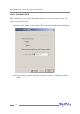
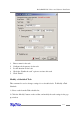

To verify an array:
1. Highlight the “Management” menu, and select the “Array Management”
function.
2. Highlight the array you want to verify.
3. Click the Verify button on the toolbar or select the “Verify” command from the
“Operation” menu.
4. Verify process will start.
7 – OCE/ORLM
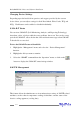
The RocketRAID 2240 supports both OCE (Online Capacity Expansion), and ORLM
(Online RAID Level Migration).
The RAID software provides support for these features through a single function,
known as OCE/ORLM.
With the OCE/ORLM function, you can transform an array from one RAID level to
another RAID level and/or resize the array dynamically, even under I/O load.
To perform OCE/ORLM on an array:
1. Highlight the “Management” menu, and select the “Array Management”
function.
2. Highlight the array you want to alter.
3. Click the button on the toolbar or select “OCE/ORLM” command from
the “Operation” menu.
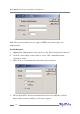
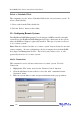
4. The OCE/ORLM window will appear.
5. The interface is very similar to the Array Creation Wizard interface. Select the
type of array you wish to change the existing array into, then set any corre-
sponding parameters (cache options, capacity, if relevant).
RocketRAID 2240 Driver and Software Installation
4-12