
User Guide
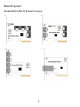
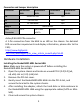


Connector and Jumper description
Connector
RocketRAID
640L
RocketRAID
642L
RocketRAID
644L
RocketRAID
644LS
A1
Active LED PIN
N/A
F1
Fail LED PIN
N/A
J1
I2C Connector
N/A
Beep 1
Alarm Buzzer
Port
Connector
SATA
SATA and
eSATA
eSATA
Mini-SAS
Active/FAIL LED PIN connector:
A 1-Pin connection from the HBA to an LED on the chassis. For detailed
LED connection requirements and display information, please refer to the
FAQ:
http://www.highpoint-
tech.com/websupport/kb_view_article_noauth.php?id=32
Hardware Installation
Installing the RocketRAID 600L Series HBA
Note: Make sure the system is powered-off before installing the
RocketRAID 600L Series HBA.
1. Open the system chassis and locate an unused PCI-E (2.0/1.0) (x4,
x8, x16) slot or (3.0) (x16) slot.
2. Remove the PCI slot cover.
3. Gently insert the RocketRAID 600L HBA into the PCI-E slot, and
secure the bracket to the system chassis.
4. After installing the adapter, attach the hard disks or disk enclosure to
the RocketRAID 600L HBA using the appropriate cables (SATA or Mini-
SAS).
5. Close and secure the system chassis.
5