
User's Manual






HF-A21-SMT Embedded WiFi Module User Manual
Shanghai High-Flying Electronics Technology Co., Ltd
www.hi-flying.com
28
3. OPERATION GUIDELINE
3.1. Configuration via Web Accessing
When first use HF-A21-SMT modules, user may need some configuration. User can connect to
HF-A21-SMT module‟s wireless interface with following default setting information and configure
the module through laptop.
Table 4 HF-A21-SMT Web Access Default Setting
Parameters Default Setting
SSID HF-A21x_AP
IP Address 10.10.100.254
Subnet Mask
255.255.255.0
User Name
admin
Password admin
3.1.1. Open Web Management Interface
Step 1: Connect laptop to SSID “HF-A21x_AP” of HF-A21-SMT module via wireless LAN card;
Step 2: After wireless connection OK. Open Wen browser and access “http://10.10.100.254”;
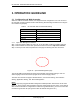
Step 3: Then input user name and password in the page as following and click “OK” button.
Figure 22. Open Web Management page
The HF-A21-SMT web management page support English and Chinese language. User can
select language environment at the top right corner and click “Apply” button.
The main menu include five pages: “Mode Selection”,” AP Interface Setting”,”STA Interface
Setting”,”Application Setting”, and “Device Management”
Notes:
Default, High-Flying suggests all Web management related operation shall execute at AP mode.
(Even you need configure STA parameters and want module works as STA mode). If user selects
STA mode and still want to configurate the module through Web browser, you have to access the
module through another AP (and get the module IP address through this AP.)