
User's Manual






HF-A21-SMT Embedded WiFi Module User Manual
Shanghai High-Flying Electronics Technology Co., Ltd
www.hi-flying.com
26
complexity. User can save the configuration information to the flash of HF-A21-SMT, then module
will go into the appointed work mode after power up.
For a module which already finished parameters setting, it will try to connect a wireless network
and server with these parameters after power up, and serial interface is also active with pre-
configured parameters. Then all the data is transferred directly between serial interface and Wifi
interface without any interpreted.
The parameters which need to configure include:
Wireless Network Parameters
Wireless Network Name(SSID)
Security Mode
Encryption Key
TCP/UDP Linking Parameters
Protocol Type
Link Type(Server or Client)
Target Port ID Number
Target Port IP Address
Serial Port Parameters
Baud Rate
Data Bit
Parity (Check) Bit
Stop Bit
Hardware Flow Control
Work Mode Selection
Transparent transmission
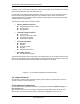
Transparent transmission demo as showing in the following figure, a HF-A21-SMT module can be
taken as a virtual serial line when UART interface working in transparent transmission mode. And
user device will realize wireless data transmition almost without any changes.
Figure 21. HF-A21-SMT Transparent Transmission Demo
2.9. Network Protocol
HF-A21-SMT module supports TCP/UDP network protocol and the port parameters can be set
via web accessing or AT+instruction set.
2.10. Parameters Configuration
HF-A21-SMT module supports two methods to configuration parameters: Web Accessing and
AT+instruction set.
Web accessing means users can configure parameters through Web browser. When HF-A21-
SMT module connected to wireless network, parameters configuration is done on a PC