
User's Manual

HF-A11x V3.1 User Manual
Shanghai High-Flying Electronics Technology Co., Ltd
www.hi-flying.com
41
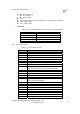
RSP: Response string;
“ok” : Success
“ERR”: Failure
[op] : =
[para-n]: Parameters if query command or Error code when error happened;
<CR>: ASCII 0x0d;
<LF>: ASCIII 0x0a;
¾ Error Code
Table 5 Error Code DescribtionHF-A11x Web Access Default Setting
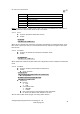
Error Code Description
-1 Invalid Command Format
-2 Invalid Command
-3 Invalid Operation Symbol
-4 Invalid Parameter
-5 Operation Not Permitted
4.2.2. AT+ Instruction Set
Table 6 AT+ Instruction Set List
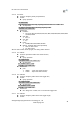
Instruction Description
<null> NULL
E Open/Close show back function
ENTM Set module into transparent transmition mode
NETP Set/Query network protocol parameters
UART Set/Query serial port parameters
UARTF Open/Close UART auto-frame function
UARTFT Set/Query UART auto-frame trigger time
UARTFL Set/Query UART auto-frame trigger length
TMODE Set/Query data transmition mode
(transparent transmition or agreement transmition)
WMODE Set/Query WIFI work mode (AP or STA)
WSKEY Set/Query WIFI security parameters as STA
WSSSID Set/Query WIFI target AP SSID parameters as STA
WSLK Query WiFi link status as STA
WSLQ Query WiFi signal strength as STA
WEBU Set/Query WEB page login parameters
(User Name and Password)
WAP Set/Query WIFI parameters as AP
WAKEY Set/Query WIFI security parameters as AP
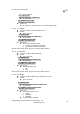
MSLP Set modules into power save mode.(Turn OFF WiFi)
WSCAN Seek AP when module works as STA mode
TCPLK Query if TCP link already build-up
WANN Set/Query WAN setting, only effective as STA mode
LANN Set/Query LAN setting, only effective as AP mode
DHCPGW Set/Query DHCP gateway address
TCPTO Set/Query TCP timeout