
User's Manual


HF-A11x V3.1 User Manual
Shanghai High-Flying Electronics Technology Co., Ltd
www.hi-flying.com
27
customer detailed requirement). So, please contact with High-Flying technical support interface to
know more about Ethernet interface networking application.
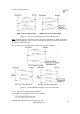
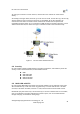
2.6.1. HF-A11x Ethernet Interface Networking (As AP)
Figure 19. HF-A11x Ethernet Interface Networking (As AP)
For above networking, HF-A11x module works as AP and also the centre of this network. All
devices’ IP address in this network shall use the same network segment with HF-A11x and they
can intercommunication with this method.
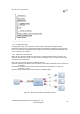
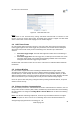
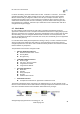
2.6.2. HF-A11x Ethernet Interface Networking (As STA, N-Ver)
Figure 20. HF-A11x Ethernet Interface Networking (As STA, N-Ver)
For above networking, HF-A11x module works as STA
(Firmware is N-Version),and module
configured as router mode. When module connect to AP, it will get wireless port IP address from
AP
(For example: 192.168.1.100).At the same time, module also form a subnet(Default
10.10.100.254
)and all devices connected to module Ethernet interface will get assigned IP
address
(For example: 10.10.100.101).So for above networking, PC1 at internal subnet can
initiate a connection to PC2 (For HF-A11x works as router mode), but PC2 can’t active initiate a
connection to PC1.
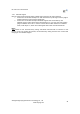
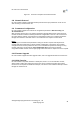
2.6.3. HF-A11x Ethernet Interface Networking (As STA, Z-Ver)
Figure 21. HF-A11x Ethernet Interface Networking (As STA, Z-Ver)