
User's Manual

23
1.8 Software AP Mode
The HWU8DD Hi-Gain USB Wireless-G Dish Adapter has a unique feature that allows
it to function as a Wireless Access Point. By changing the mode in the Configuration
Utility the HWU54G can provide wireless access to surrounding clients. Configuring
the AP parameters such as channel, SSID, MAC Address Filtering, WEP encryption
and so on are described in the following:
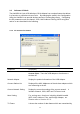
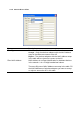
3.1.3 AP Connection Status
Parameter Description
Mode Station – Set the USB adapter a wireless client.
Access Point – Turns the USB adapter to function as a
wireless AP.
Network Adapter Display the product information of the USB Adapter.
Connect Station List Display all the MAC Addresses of the wireless adapters which
are connecting to the AP.
Current Network Setting Display the connection setting of the current network. It
includes Channel, SSID, WEP and TX Power Level.
More Setting For setting more functions including disable/enable
WEP, MAC Address Filter and Bridge Adapter, etc.
Please refer to Section 3.5.2.
TX Frame It shows the number of data frames which are transmitted by