
User`s manual




70
3-4-7 Setup procedure for ‘DDNS’:
DDNS (Dynamic DNS) is an IP-to-Host name mapping service for those
Internet users who don’t have a static (fixed) IP address. It will be a problem
when such users want to provide services to other users on the Internet,
because their IP address will vary every time when connected to the Internet,
and other user will not be able to know the IP address they’re using at a
certain time.
This router supports DDNS service of several service providers, for
example:
DynDNS (http://www.dyndns.org)
TZO (http://www.tzo.com)
Please go to one of the DDNS service provider’s web pages listed above,
and get a free DDNS account by the instructions given on their webpage.
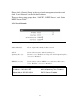
Dynamic DNS (1): If you want to enable DDNS function, please select ‘Enabled’;
otherwise please select ‘Disabled’.
Provider (2): Select your DDNS service provider here.
1
2
3
4
5
6