
User`s manual




61
Internet. “Idle Time Out” is set to stop the connection when the
network traffic is not sending or receiving after an idle time.
Manual – After you have selected this option, you will see the
“Connect” button and “Disconnect” button, click “’Connect”
and the router will connect to the ISP. If you want to stop the
connection, please click “Disconnect” button.
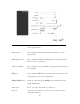
Idle Time Out (6): If you have selected the connection type to
“Connect-On-Demand”, please input the idle time out.
After you finish with all settings, please click ‘Apply’ (7) button and the
following message will be displayed on your web browser:
Please click ‘Go Back’ to go back to previous setup menu, or click ‘Apply’
to reboot the router so the settings will take effect. Please wait 30-60
seconds for the router to reboot.