
User`s manual






56
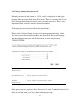
3-4 Setup Internet Connection (Setup)
Internet connection setup can also be done by using ‘Quick Setup’ menu
described in Chapter 2-3.
To start configuration, please follow the instructions:
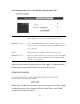
Please click ‘General Setup’ tab at the top of the web management interface,
and on the left hand column, click ‘Internet Connection’.
Automatic Configuration (DHCP) - Please go to section 3-4-1
Static IP - Please go to section 3-4-2
PPPoE - Please go to section 3-4-3
PPTP - Please go to section 3-4-4
L2TP - Please go to section 3-4-5