
User`s manual






54
3-3 Remote Management
This router does not allow management access from Internet, to prevent
possible security risks (especially when you defined a weak password, or
didn’t change default password). However, you can still manage this router
from a specific IP address by enabling the ‘Remote Management’ Function.
Please click ‘General Setup’ tab at top of web management interface, then
click ‘Remote Management’ on the left hand column, and the following
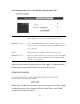
message will be displayed on your web browser:
Host Address (1): Input the IP address of the remote host you wish to initiate a
management access.
Port (2): You can define the port number this router should expect an
incoming request. If you’re providing a web service (default port
number is 80), you should try to use other port number. You can
use the default port setting ‘8080’, or something like ‘32245’ or
‘1429’. (Any integer between 1 and 65534)
Enabled (3): Select the field to start the configuration.
After you finish with all settings, please click ‘Apply’ (4) button and the
following message will be displayed on your web browser:
1
2
3
4