
User`s manual






52
3-2 Change management password
Default password of this router is ‘1234’, and it’s displayed on the login
prompt when accessed from the web browser. There’s a security risk if you
don’t change the default password, since everyone can see it. This is very
important when you have wireless function enabled.
To change password, please follow the instructions:
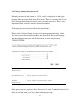
Please click ‘General Setup’ at top of web management interface, select
‘System’ tab on the left hand column, and then click ‘Password Settings’,
and the following message will be displayed on your web browser:
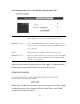
Current Please input current password here.
Password (1):
New Password (2): Please input new password here.
Confirm Please input new password here again.
Password (3):
If the password you typed in ‘New Password’ (2) and ‘Confirm Password’ (3)
field are not the same, you’ll see the following message:
1
2
3