
User`s manual






50
3-1 Time zone and time auto-synchronization
Please follow the following instructions to set time zone and time
auto-synchronization parameters:
Please click ‘General Setup’ at the top of web management interface, select
‘System’ on the left hand column, and select ‘Time Zone’.
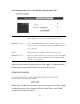
The time zone settings will be displayed in your web browser: Please select
the correct time zone from the drop-down list, and input the IP address or
host name of the time server. If you want to enable daylight savings setting,
please check ‘Enable Function’ box, and set the duration of daylight setting.
After you finish with all settings, please click ‘Apply’ button and the
following message will be displayed on your web browser: