
User`s manual




39
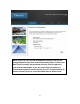
2-3-2 Setup Procedure for ‘DSL and Cable Modem Setup (Static IP Address)’:
IP address assigned Please input IP address assigned by your service provider.
Provider (1):
Subnet Mask (2): Please input subnet mask assigned by your service provider
DNS address (3): Please input the IP address of DNS server provided by your
service provider.
Default Gateway Please input the IP address of DNS server
Address (4): provided by your service provider.
When you finish with all settings, press ‘Continue’ (5); if you want to go
back to previous menu, click ‘Back’.
2
5
NOTE: You can choose this Internet connection method if your
service provider assigns a fixed IP address (also known as a static
address) to you, and not using DHCP or PPPoE protocol. Please
contact your service provider for further information.
You must use the addresses provided by your Internet service
provider, wrong value settings will cause connection problems.
1
3
4