
User`s manual




106
4-2-1 Basic NAT Settings (Enable or disable NAT function)
Please click ‘General Setup’ at the top of web management interface and
click ‘NAT’ on the left hand column.
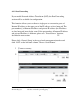
To enable NAT function, please select ‘Enable’ for ‘Enable NAT module
function’ (1); to disable, please select ‘Disable’.
After you made the selection, please click ‘Apply’ button (2) and the
following message will be displayed on your web browser:
Please click ‘Go Back’ to go back to previous setup menu, or click ‘Apply’
to reboot the router so the settings will take effect. Please wait 30-60
seconds for the router to reboot.
1
2