
User`s manual




102
4-1-2 Add a New QoS Rule
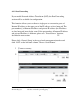
After you click ‘Add’ button in QoS menu, the following message will
appear:
Rule Name (1): Please give a name to this QoS rule (enter up to 15
alphanumerical characters)
Bandwidth (2): Set the bandwidth limitation of this QoS rule. You have to select
the data direction of this rule (Upload of Download), and the
speed of bandwidth limitation in Kbps, then select the type of
QoS: ‘guarantee’ (guaranteed usable bandwidth for this rule) or
‘max’ (set the maximum bandwidth for the application allowed
by this rule).
Local IP Address (3): Specify the local (source) IP address that will be affected by this
rule. Please input the starting IP address in the left field, and
input the end IP address in the right field to define a range of IP
addresses, or just input the IP address in the left field to define a
single IP address.
1
2
3
4
5
6
7
8
9